
JavaScript and the DOM
24 January 2023
Analogy to describe JS and its relationship to HTML and CSS
Imagine we had a puppet show. We begin our show with just HTML so we only have a static black outline of a puppet on a stick. We then add in our CSS our pupper now has a bright colourful outfit and excellent facial expression, however it is still static it does not respond to anything. This is where JS comes in. When we add in the JS code the puppet will begin to act and respond to the audience.


Explain control flow and loops using an example process from everyday life
A control flow in everyday life could be making a sandwich:
- Get the bread
- Spread the butter on the bread
- Add ham to bread
- Put tomato on the ham
- put lettuce on the tomato
- put a slice of bread on the lettuce
- Cut the sandwich in the middle
You complete the sequence in this order everytime.
Then the loop would be if you made another sandwich for someone else in your family, you would then repeat this sequence until the number of sandwiches needed are made.
Describe what the DOM is and an example of how you might interact with it.
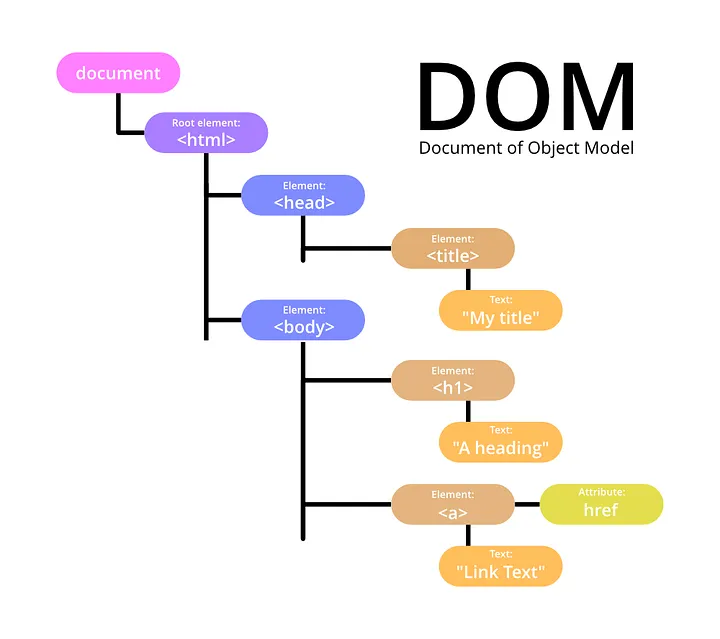
In my own words the DOM is a tree structure where all the parts of
the document are kept. Every element will have a parent, and may
have a child element. You use the DOM to interact and manipulate the
content of a webpage. Whenever an action is made on a website it is
flipping through the DOM to find the right element to perform that
action on. It is the behind the scenes framework that allows the
webpage to respond to the users actions.
With regards to interacting with the DOM you may use it to try out a
new piece of code, check for bugs or even to collect data from your
website usage.
Explain the difference between accessing data from arrays and objects.
Arrays
An array is a collection of data that is stored together.

It maintains the elements in the same order each time using index numbers i.e index 0 = 'cat' index 1 = 'dog', these index numbers are also how to access the data. Arrays have built in methods such as 'push', 'pop' and 'for each'
Objects
Objects are also a collection of data however the data is stored in Key-Value pairs.
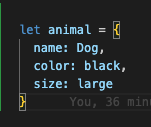
You then access the value data using the key i.e animal.size would return large. The data in an object is not stored in a specific order and the order may change. Objects do not have any built in methods but is more flexible for storing data.
Explain what functions are and why they are helpful.
A function is letting the computer know what you want it to do (i.e. set of instructions) when a certain input happens. For example every time I click sign in I want the log in page to load. They are helpful because they are reusable pieces of code and they help to organise your code into readable chunks.